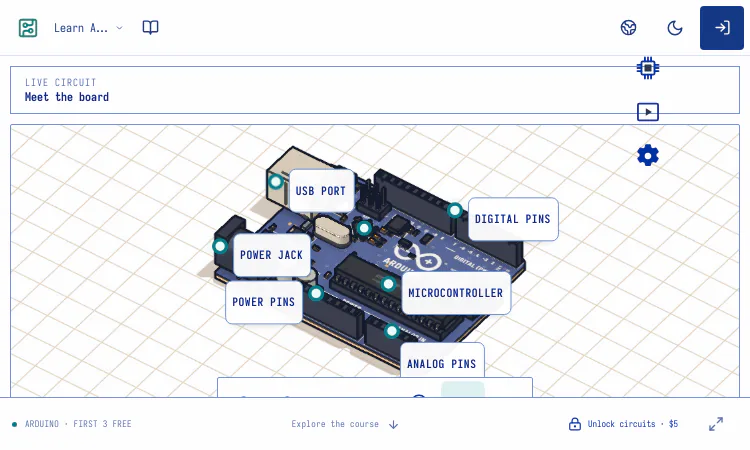
Learn Arduino is an interactive electronics course built around a virtual 3D Arduino Uno — and it is one of the few that lets you actually start before you decide anything. The first three lessons are free, the workbench runs in any browser, and by the end of lesson three you have already read inputs, driven outputs and watched code move a circuit. This guide walks through exactly how to start Learn Arduino, what the 16 lessons cover, and how to get the most out of the Learn Arduino method.
Go to the Learn Arduino site and the workbench loads in your browser — no installation, no kit, no account for the free lessons. You arrive at an interactive 3D Uno you can rotate, with every part labeled on the model: USB port, power jack, power pins, microcontroller, digital pins, analog pins. Before any theory, Learn Arduino gives you spatial familiarity with the board, which is the single most useful thing a Learn Arduino beginner can acquire. The 3D view needs JavaScript and WebGL; touch controls make it work on phones and tablets, though a larger screen shows board and code together more comfortably.
The free tier is a deliberate on-ramp, and it is worth doing exactly as sequenced:
Twenty minutes, three Learn Arduino lessons, zero dollars — and you now understand more practical electronics than most people who have owned a starter kit for years.
If the Learn Arduino free trio lands, the remaining 13 lessons unlock for $5 once — a lifetime purchase, no subscription, bound to your Google account. The paid Learn Arduino arc climbs steadily: a potentiometer for analog input, RGB colour mixing, sensing lessons for light, distance, temperature and force, actuation through a piezo buzzer, an eight-key mini piano, a transistor-switched motor, a servo sweep and a stepper motor, then integration lessons — a smart-plant monitor linking soil moisture to an OLED display, and a capstone parking sensor combining distance measurement with traffic lights. Each experiment keeps the same Learn Arduino structure: adjust a value, watch every view respond, explain the change.
Two habits will maximize the Learn Arduino course. First, actually predict: the workspace invites you to guess an outcome before running the simulation, and the guess is where learning happens — the course's own standard is that you can explain what changed and why, not just that you clicked through. Second, respect the model: the Learn Arduino simulator uses teaching models that simplify electrical behaviour, and it does not compile arbitrary C++ or upload to hardware. Treat it as a concept lab. When an experiment earns a physical version, check the component specifications and rebuild it in the Arduino IDE with real parts — the course hands you off rather than pretending to be a hardware toolchain.
Progress and simulator settings stay in your current browser; the purchase follows your Google account across devices, a distinction the FAQ states plainly. The site runs in nine languages, including German, Spanish, French, Japanese, Korean, Portuguese (Brazil) and Traditional Chinese. Sibling courses — Protocol Explorer (39 network protocols) and Learn Bitcoin (18 lessons) — extend the same interactive style if your curiosity moves beyond circuits.
Here is how your first Learn Arduino hour should go. Minutes 0–10: skip nothing — rotate the Learn Arduino board, read every label, find each pin the tour names. Minutes 10–25: run the free Learn Arduino blink lesson and, before each run, say your prediction out loud; the Learn Arduino loop only pays when the guess is real. Minutes 25–40: push through the button lesson and notice the Learn Arduino input-process-output pattern appearing for the second time. Minutes 40–55: revisit whichever experiment surprised you most — the Learn Arduino lessons are built for reruns, and the surprise is where your model was wrong. Minutes 55–60: read the pricing page and decide about the $5 unlock. At that point you will know, from evidence, whether Learn Arduino is for you — and if it is, the rest of the Learn Arduino curriculum is one purchase away. Sixty minutes, three Learn Arduino lessons, one decision made on data: that is a good first hour by any standard.
Learn Arduino is the lowest-friction serious start in electronics education: a rotatable 3D Uno, three genuinely free lessons, a $5 lifetime unlock for the rest, and a method built on prediction and visible proof. Spend an hour with the free tier — you will learn Arduino faster than you thought possible, and know immediately whether to go further.
What do I need to start Learn Arduino? A browser with JavaScript and WebGL. The Learn Arduino workbench needs no installation, no components and no account for the free lessons.
Are the first three lessons really enough to judge the course? Yes — they cover board anatomy, digital output and digital input, which is the foundation the other 13 Learn Arduino lessons build on.
How long does the free tier take? Most people finish the three free Learn Arduino lessons in under an hour, and each Learn Arduino experiment invites reruns, so take the time you want.
Is $5 a subscription? No. It is a one-time lifetime unlock of the 13 paid lessons, tied to your Google account.
Can I do my own projects inside the course? The simulator runs supplied teaching sketches with adjustable values; for your own programs, take what you learned from Learn Arduino to the Arduino IDE and real hardware.

Flying Roadster AI Video Generator has a clear workflow: upload a car, choose framing, and create a private flying car clip for download.

Project Moon Life is a free, no-sign-in browser simulator with a clear life loop, changing conditions, and an archive of personal outcomes.
Random Topic Generator is a free AI-powered speaking practice tool that helps users generate fresh topics for impromptu speeches, presentations, conversations.
Seven free football games in your browser: career sims, a legend-guessing quiz, squad building, and a daily seeded challenge — no account, no download.
An instant PSL rating that never leaves your device: one photo is processed entirely in-browser and returns a score, tier, breakdown, and shareable card.
Recreate the hidden stripe of a world flag with HSB sliders and a live preview — five rounds a game, scored by how perceptually close your color lands.