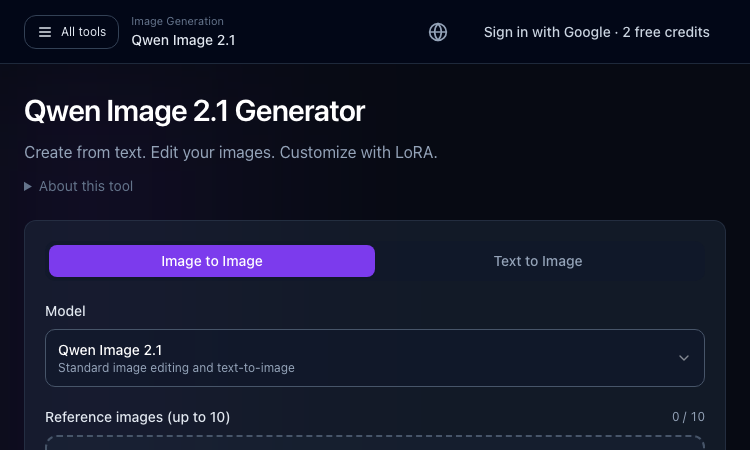
Qwen Image 2.1 Generator is a browser-based image creation and editing workspace on ImageLayered, powered by Qwen Image 2.1. It offers text-to-image and image-to-image modes, allowing users to make a new visual or refine supplied reference material in one place. The Qwen Image 2.1 Generator works best when the goal and expected output are clear before work begins. Teams can use Qwen Image 2.1 Generator to test the same task against their current process.
Choose text-to-image or editing, describe what should change and what to preserve, and add references if needed. The workspace supports up to ten images, LoRA customization, and 1K, 1.5K, or 2K outputs. Start with a clear prompt and adjust one constraint at a time. With Qwen Image 2.1 Generator, a small representative task is a better first test than a complicated edge case.
Qwen Image 2.1 Generator This page lets users try Qwen Image 2.1 without first assembling a local ComfyUI workflow. Use it for mockups, concepts, background changes, or iterative edits. The open model is also available for local workflows when users prefer pipeline control and have compatible hardware. The Qwen Image 2.1 Generator can be compared on the same example with another option when the choice is not obvious.
When listings look alike, filter by workflow rather than marketing label. Check whether the product accepts your source material, exposes needed controls, and returns an output you can review or reuse. For this audience, Qwen Image 2.1 Generator is easiest to judge in context rather than from a headline alone.
Check current account requirements, remaining credits, model options, and file rules before uploading work. For confidential images, confirm the service terms and choose a local workflow if needed. Check that Qwen Image 2.1 Generator fits your requirements for privacy, rights, setup, and output quality before relying on it.
Start with Qwen Image 2.1 Generator, test one representative task, and use the official documentation to confirm current access. Open the generator, select a mode, and begin with a small image edit or a short text prompt. The Qwen Image 2.1 Generator page has its current controls and terms. Compare Qwen Image 2.1 Generator with your existing workflow before adopting it.
Before writing a prompt, decide whether the job is to create a new scene or edit an existing image. Qwen Image 2.1 Generator exposes text-to-image and image-to-image routes, and each benefits from a different description. For a new image, name the subject, setting, composition, lighting, and desired style. For an edit, state what should change and what must stay. Qwen Image 2.1 Generator is easier to steer when a request describes visible outcomes instead of broad adjectives alone. Save the initial result as a baseline for comparison.' Qwen Image 2.1 Generator should be judged in that context. In practice, Qwen Image 2.1 Generator can be judged by its results.
A prompt can be organized from the most important visual fact to supporting detail: subject, action, environment, composition, light, and finish. Qwen Image 2.1 Generator users can make each instruction concrete, such as placing an object on the left or leaving open space for a title. If everything is described as equally important, the model may compromise across competing requirements. Begin with a compact prompt, inspect the image, and add one detail only when it solves a visible problem. This creates a more understandable link between wording and result.' Qwen Image 2.1 Generator should be judged in that context. In practice, Qwen Image 2.1 Generator can be judged by its results.
When an existing image contains useful composition or identity, image-to-image editing can preserve the parts that already work. Tell Qwen Image 2.1 Generator what to replace, what to keep, and how the edited area should match the rest. Be precise about boundaries: for example, change a background while retaining the subject's pose and clothing. Keep an untouched copy of the source and compare before and after at the same scale. If the whole image changes unexpectedly, simplify the instruction and specify the details that must remain consistent.' Qwen Image 2.1 Generator should be judged in that context. In practice, Qwen Image 2.1 Generator can be judged by its results.
Reference images can communicate style, subject appearance, layout, or other visual constraints. The ImageLayered workspace supports multiple reference images, so decide what role each image should play rather than uploading a pile of similar examples. Qwen Image 2.1 Generator is more predictable when the text explains which reference guides composition and which guides appearance. Check that every reference is suitable to use and does not contain private or copyrighted material without permission. Remove irrelevant references when they pull the output away from the intended result.' Qwen Image 2.1 Generator should be judged in that context. In practice, Qwen Image 2.1 Generator can be judged by its results.
A LoRA can help adapt generation toward a particular visual concept or identity, but it should be treated as a separate variable in an experiment. Qwen Image 2.1 Generator offers LoRA customization in the described workspace; check its current options, compatibility, and terms. First establish a baseline without additional adaptation, then change one LoRA setting at a time. Confirm that training or reference material is authorized and that the resulting images do not unintentionally imitate a protected style or person. Keep notes on settings so successful work can be repeated.' Qwen Image 2.1 Generator should be judged in that context. In practice, Qwen Image 2.1 Generator can be judged by its results.
The available 1K, 1.5K, and 2K output choices can support different stages of a project. Qwen Image 2.1 Generator users might begin with a smaller output while exploring composition, then choose a higher resolution for a closer review or a downstream design step. Higher pixel dimensions do not automatically fix anatomy, text, or layout. Check crop, aspect ratio, and the actual delivery requirements before spending time refining details. If the final destination is a small thumbnail, a clear composition can matter more than maximum resolution.' Qwen Image 2.1 Generator should be judged in that context. In practice, Qwen Image 2.1 Generator can be judged by its results.
A hosted generator can make initial experimentation convenient, while a local ComfyUI setup can provide greater control over nodes, files, and repeatability for users with compatible hardware. Qwen Image 2.1 Generator lets people test a browser workflow without first building that pipeline. Local execution involves its own model files, memory needs, dependencies, and maintenance. Choose based on whether the priority is a quick first result or granular workflow control. For confidential source images, assess the privacy terms of a hosted service and consider a local process when appropriate.' Qwen Image 2.1 Generator should be judged in that context. In practice, Qwen Image 2.1 Generator can be judged by its results.
Image generation and editing can support storyboards, marketing concepts, interface mockups, mood boards, and background variations. Qwen Image 2.1 Generator should be evaluated against one concrete deliverable, with review criteria such as subject consistency, composition, legibility, and editability. A concept image is not automatically production-ready. Designers may need to correct typography, adjust brand colors, or rebuild elements in a vector tool. Treat generated material as a draft asset and retain the editable project files needed for final production.' Qwen Image 2.1 Generator should be judged in that context. In practice, Qwen Image 2.1 Generator can be judged by its results.
Review important areas at full size, including hands, faces, repeated objects, small labels, and boundaries between edited and preserved regions. Qwen Image 2.1 Generator iterations should change one instruction at a time so that improvements are attributable. Save prompt versions with outputs and note which settings were used. If text in an image is essential, verify it carefully or add it later with a design tool. A human quality check catches subtle artifacts that can disappear in a small preview but become obvious in a published asset.' Qwen Image 2.1 Generator should be judged in that context. In practice, Qwen Image 2.1 Generator can be judged by its results.
Before uploading source material, check the service's current terms, retention behavior, and account requirements. Qwen Image 2.1 Generator users should have permission to use reference images, trademarks, photographs, and recognizable likenesses. Avoid testing with confidential assets unless the organization has approved the service and workflow. Record which images were generated, what inputs informed them, and whether any output needs disclosure or review. Rights and privacy checks belong in the creative process from the start, especially when assets may be used in advertising or customer-facing products.' Qwen Image 2.1 Generator should be judged in that context. In practice, Qwen Image 2.1 Generator can be judged by its results.
AI Kenerate ships marketing-ready AI content — UGC ads, product videos, try-ons, and voiceovers from one workspace.Try AI Kenerate now
Random Topic Generator is a free AI-powered speaking practice tool that helps users generate fresh topics for impromptu speeches, presentations, conversations.
Seven free football games in your browser: career sims, a legend-guessing quiz, squad building, and a daily seeded challenge — no account, no download.

An instant PSL rating that never leaves your device: one photo is processed entirely in-browser and returns a score, tier, breakdown, and shareable card.
Recreate the hidden stripe of a world flag with HSB sliders and a live preview — five rounds a game, scored by how perceptually close your color lands.
Load two portraits and compare: structured PSL scoring, an eight-axis radar chart, a final verdict, and a downloadable card — in scientific or roast mode.