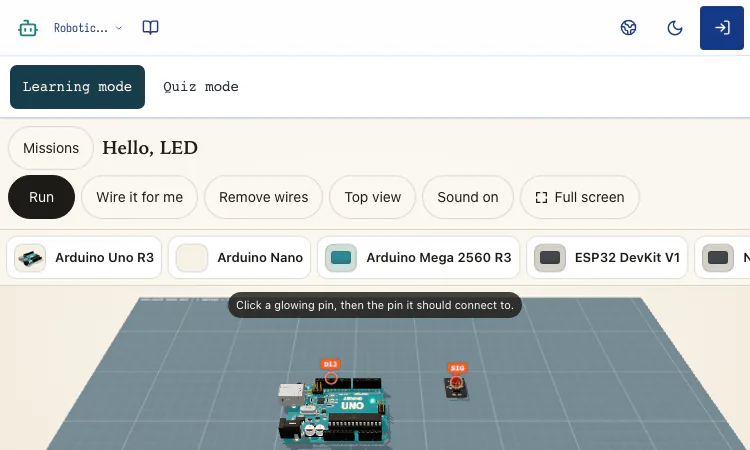
Robotics Lab is a free-to-start learning app for robot boards that unlocks everything — eight boards, eleven guided missions, free build mode and a full quiz system — for a single $10 payment. No subscription, no monthly fee, no time-limited trial dressed up as a free plan. In a market of education apps that bill forever, Robotics Lab is built on a straightforward promise: try the first missions free, pay once when you are convinced, own the whole course across all your devices.
The free tier of Robotics Lab is not a demo — it is three complete missions and three complete boards, playable without an account and without payment details. You wire a real circuit on a real 3D model, run it, and watch the modeled response. That is enough to know whether the Robotics Lab approach fits how you learn. When it does, the one-time $10 purchase unlocks all content for your account through Google sign-in, valid across devices. There is nothing to cancel later, because the Robotics Lab model has no recurring billing to escape.
Compare that with the alternatives: a physical starter kit costs multiples of $10 before you wire a single LED, and subscription learning platforms cost more than that every month. Robotics Lab delivers an interactive 3D workbench, a full curriculum and quiz training for less than the price of a breadboard and a handful of jumpers.
💡 Value check: if you are even considering buying an Arduino starter kit, do the free "Hello, LED" mission in the Robotics Lab app first. It costs nothing and tells you whether hands-on electronics is for you.
Every mission in the Robotics Lab app validates the teaching circuit before power-up, flags missing grounds and unfinished signals, supplies example code with serial output, and models the circuit response so you see code and behavior together.
Robotics Lab is transparent about scope in a way worth rewarding. It is an educational model rather than a replacement for an electrical simulator, a datasheet or a physical safety check — the app itself tells you to verify pin ratings and electrical limits in official documentation before building real circuits. It is also honest about purchases: each course in the family shows its free allowance and purchase scope before checkout, and quiz records stay local in your browser rather than behind an account wall.
The wider Robotics Lab course menu connects to sibling learning tools — Learn Arduino for more circuit lessons, Protocol Explorer for network protocols, Learn Bitcoin for transactions, mining and consensus — so a single ecosystem covers several self-study tracks, each with the same try-free-then-pay-once structure.
Begin with the free missions in the Robotics Lab app: locate the glowing pin, complete the wire, press Run, and watch your first circuit come alive in 3D. If the Robotics Lab method clicks, the one-time $10 unlock is the cheapest serious electronics education you will find anywhere. If it does not click, you have spent nothing — which is exactly how a fair learning app should work.
The honest accounting makes the Robotics Lab case by itself. A physical starter kit — board, breadboard, jumpers, a handful of modules — runs $30 to $60 before the first LED blinks, and half of it frustrates beginners into quitting. Subscription learning platforms charge $10 to $30 every month, quietly becoming the most expensive way to learn anything. A single wrong board purchase, made from product photos, costs more than Robotics Lab charges in total.
Against that backdrop, the Robotics Lab pricing reads almost like a rounding error. The free tier of Robotics Lab — three missions, three boards, no account — replaces the starter-kit gamble entirely: you find out whether hands-on electronics suits you before any money moves anywhere near the Robotics Lab checkout. In short: Robotics Lab free means actually free, Robotics Lab paid means once, and the whole Robotics Lab promise is that you never subscribe to learn. The $10 unlock replaces the subscription: all eight boards, eleven missions, free build mode and quiz training, once, forever, across devices. Nothing in the Robotics Lab app nags for a renewal because there is no renewal to nag for.
The value per dollar is concrete: for $10, Robotics Lab delivers roughly the first month of a typical electronics course's practical content, with unlimited repetition and zero consumables. For parents, the calculation is safer still — a child can exhaust the entire free tier of Robotics Lab before a single dollar is spent, and the upgrade happens only if the interest has proven durable. Fair pricing is a feature, and the Robotics Lab app treats it as one.
Q: Is the Robotics Lab free tier really usable, or just a teaser?
A: Genuinely usable — three missions and three boards with full wiring, checking and simulation, no account or payment details required.
Q: Does the $10 Robotics Lab purchase ever expire or renew?
A: No. It is a single one-time purchase linked to your Google account, unlocking all content across devices with no subscription attached.

Flying Roadster AI Video Generator has a clear workflow: upload a car, choose framing, and create a private flying car clip for download.

Project Moon Life is a free, no-sign-in browser simulator with a clear life loop, changing conditions, and an archive of personal outcomes.
Random Topic Generator is a free AI-powered speaking practice tool that helps users generate fresh topics for impromptu speeches, presentations, conversations.
Seven free football games in your browser: career sims, a legend-guessing quiz, squad building, and a daily seeded challenge — no account, no download.
An instant PSL rating that never leaves your device: one photo is processed entirely in-browser and returns a score, tier, breakdown, and shareable card.
Recreate the hidden stripe of a world flag with HSB sliders and a live preview — five rounds a game, scored by how perceptually close your color lands.